Mastering Microsoft Certifications: A Guide for IT Professionals
Microsoft certifications have become one of the most effective ways for IT professionals to validate their skills, grow their careers, and stay competitive in a rapidly evolving technology landscape. As Satya Nadella, CEO of Microsoft, famously said:
“We’re moving into a world where the most valuable skill you can have is the ability to learn new skills.”
At Foster-Melliar, we strongly believe that continuous learning is essential – but choosing the right path to certify is just as important as the learning itself. With so many Microsoft certifications available, understanding where to start and how to progress can make the journey far more structured, achievable, and rewarding.
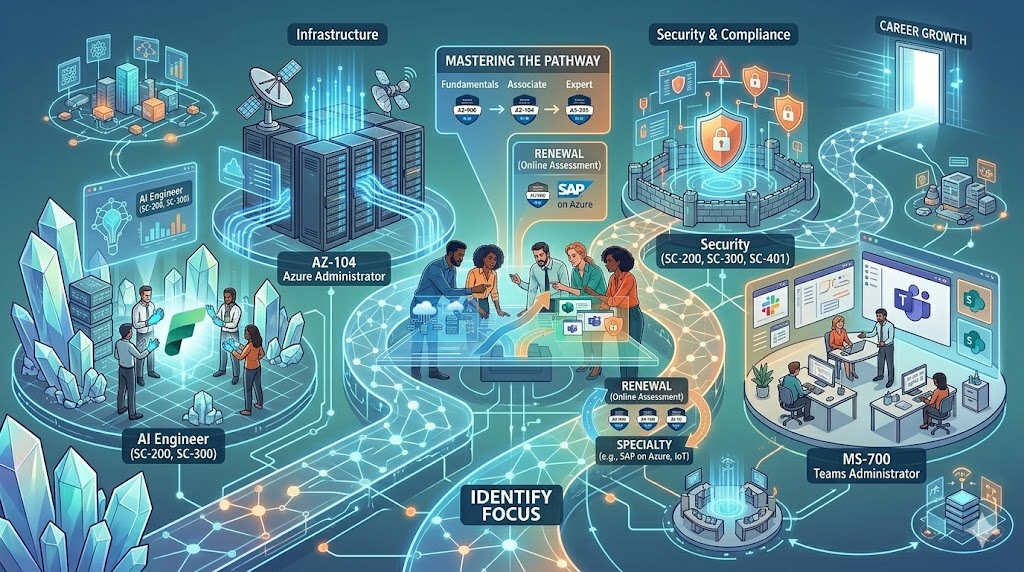
Start by Identifying Your Technology Focus
Before selecting a certification, it’s important to determine which area of technology aligns with your career goals and interests. Microsoft certifications are grouped into several major solution areas, including:
- Data & AI – Azure Data, Artificial Intelligence, and Microsoft Fabric
- Infrastructure – Azure administration, networking, and Windows Server
- Digital & App Innovation – Application development and Power Platform
- Business Applications – Dynamics 365 solutions for finance, sales, and customer service
- Modern Work – Microsoft 365, Teams, and collaboration technologies
- Security – Security, compliance, and identity management solutions
Once you’ve identified your preferred technology path, the next step is to evaluate your current experience level. Are you a complete beginner, an intermediate professional, or an experienced IT specialist looking to advance into expert-level roles?
Understanding your starting point helps ensure you choose certifications that match your skill level and career ambitions.
Understanding Microsoft Certification Levels
Microsoft certifications are structured into four distinct levels, each designed to support different stages of professional growth.
Fundamentals Certifications
Fundamentals certifications are ideal for beginners and individuals entering the Microsoft ecosystem for the first time. These certifications provide foundational knowledge of Microsoft technologies and concepts. Popular entry-level certifications include:
AZ-900: Microsoft Azure Fundamentals
MS-900: Microsoft 365 Fundamentals
SC-900: Microsoft Security, Compliance, and Identity Fundamentals
These certifications are highly recommended for those with limited technical experience or professionals transitioning into IT-related roles.
Associate Certifications
Associate-level certifications are role-based and designed for professionals with practical,
hands-on experience. These certifications validate the skills required to perform specific job
roles effectively.
Examples include:
- AZ-104: Azure Administrator
- PL-300: Power BI Data Analyst
- SC-300: Identity and Access Administrator
At this level, professionals should focus on building deeper expertise within their chosen technology area.
Expert Certifications
Expert certifications demonstrate advanced technical knowledge and the ability to design, implement, and manage complex solutions.
Common expert-level certifications include:
- AZ-305: Azure Solutions Architect Expert
- AZ-400: DevOps Engineer Expert
These certifications are best suited for experienced IT professionals who are solving real-world enterprise challenges and leading technical implementations.
Specialty Certifications
Specialty certifications focus on niche and highly specialised technologies. They validate
expertise in advanced workloads and specific technical environments.
Examples include certifications focused on:
- Azure IoT
- SAP on Azure
- Virtual Desktop Infrastructure (VDI)
These certifications are valuable for professionals looking to specialise in emerging or highly technical areas.
Choosing the Right Path Based on Your Experience
For Beginners
If you are new to Microsoft technologies or IT in general, starting with a fundamentals certification is the best approach. Certifications like AZ-900 or MS-900 provide a strong understanding of cloud concepts, Microsoft services, and core technology principles.
These certifications create the foundation needed to progress into more advanced role-based
certifications later on.
For Intermediate Professionals
Professionals who already hold foundational certifications or have practical industry experience should focus on associate-level certifications aligned with their career goals.
For example:
- Interested in Cloud & Infrastructure? Consider Azure Administrator or Developer pathways.
- Pursuing Data & AI? Explore Azure AI Engineer or Power BI Data Analyst certifications.
- Focused on Security? Certifications such as SC-200, SC-300, and SC-401 are excellent options.
- Interested in Business Applications? Dynamics 365 and Power Platform certifications are ideal pathways.
At this stage, the goal is to build specialised expertise that directly supports your professional
role.
For Advanced IT Professionals
Experienced professionals should focus on expert and specialty certifications that validated strategic and advanced technical capabilities.
Expert-level certifications demonstrate your ability to architect solutions, manage enterprise-scale environments, and lead digital transformation initiatives.
Specialty certifications can further differentiate your expertise in niche technical areas and
emerging technologies.
Understanding Certification Renewal
An important aspect of Microsoft certifications is understanding their renewal requirements.
Most role-based and specialty certifications expire annually and must be renewed to ensure professionals remain current with evolving technologies. Renewal is completed through an online assessment on Microsoft Learn rather than retaking the full exam.
However, fundamental certifications such as AZ-900 and MS-900 do not expire.
Keeping certifications active is essential, as renewing is significantly easier and more cost- effective than rewriting the full certification exam after expiry.
Final Thoughts
Choosing the right Microsoft certification path can initially seem overwhelming, but with the right guidance and a structured approach, the journey becomes far more manageable.
Whether you are just starting your IT career, transitioning into cloud technologies, or advancing into expert-level specialisations, selecting a certification pathway aligned with your goals is the key to long-term success.
At Foster-Melliar, we are passionate about helping professionals build future-ready Microsoft skills that drive career growth and business impact.
If you’re ready to start your Microsoft certification journey and need guidance on selecting the right path, our team is here to help.